Same Model, Different Harness, Worlds Apart: I Read DeepSeek Harness's Source. Here's What's Actually New.

· 14 min read
Booker Zhao
AI Full-Stack Engineer / CloudBase AI ToolKit Author

The model is the soul. The harness is the body.

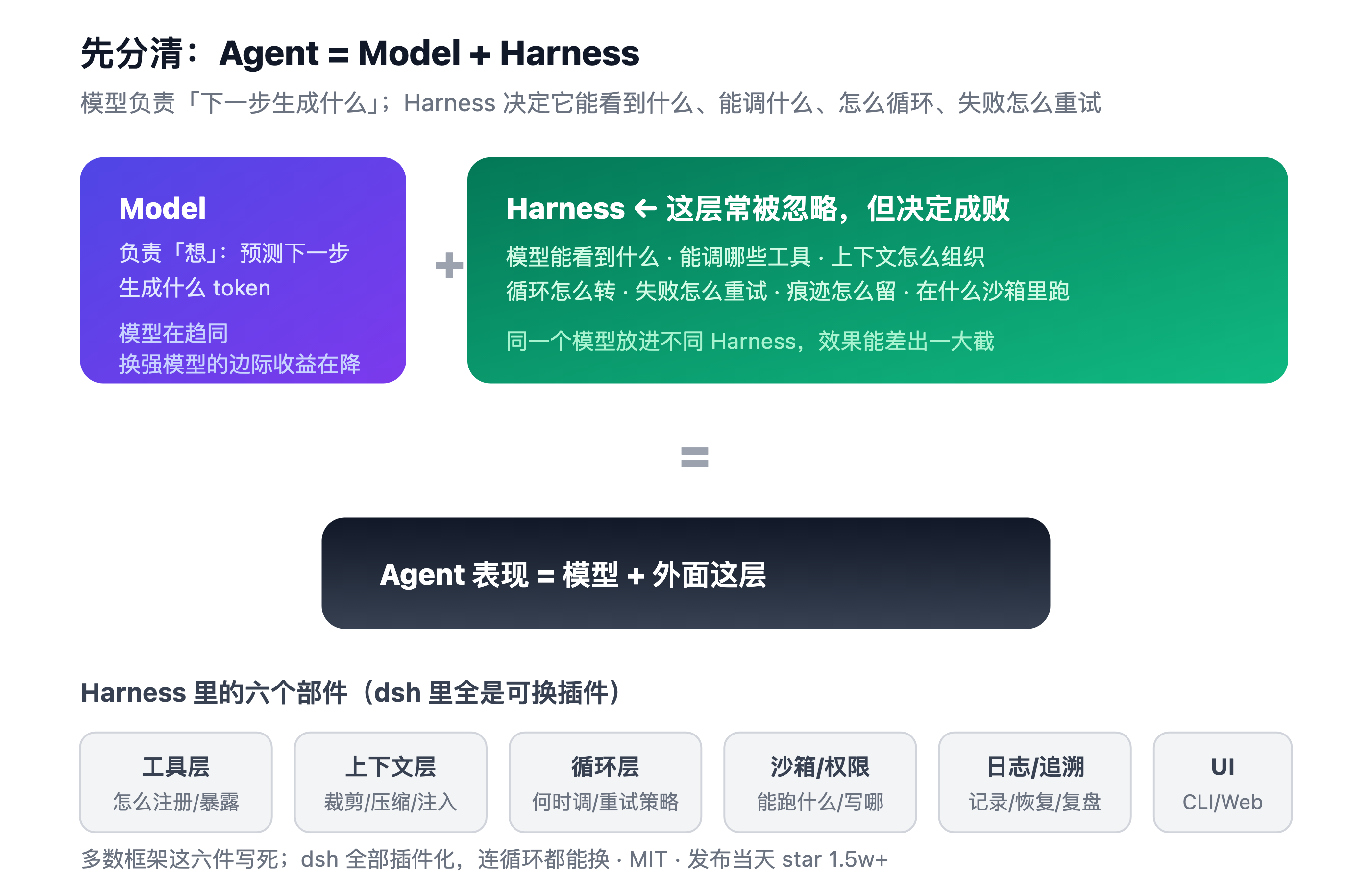
Agent = Model + Harness The model thinks. The harness does.

Hi, I'm Booker.

Today I'm taking apart DeepSeek Harness (dsh), open-sourced by DeepSeek yesterday (2026-08-13).

This is not a secondhand recap. I read the source and the official docs. I'll walk through its three real design decisions, pour some cold water, and honestly tell you my first run failed.

Open Plugins: The Plugin Standard for AI Coding Tools

· 18 min read
Booker Zhao
AI Full-Stack Engineer / CloudBase AI ToolKit Author

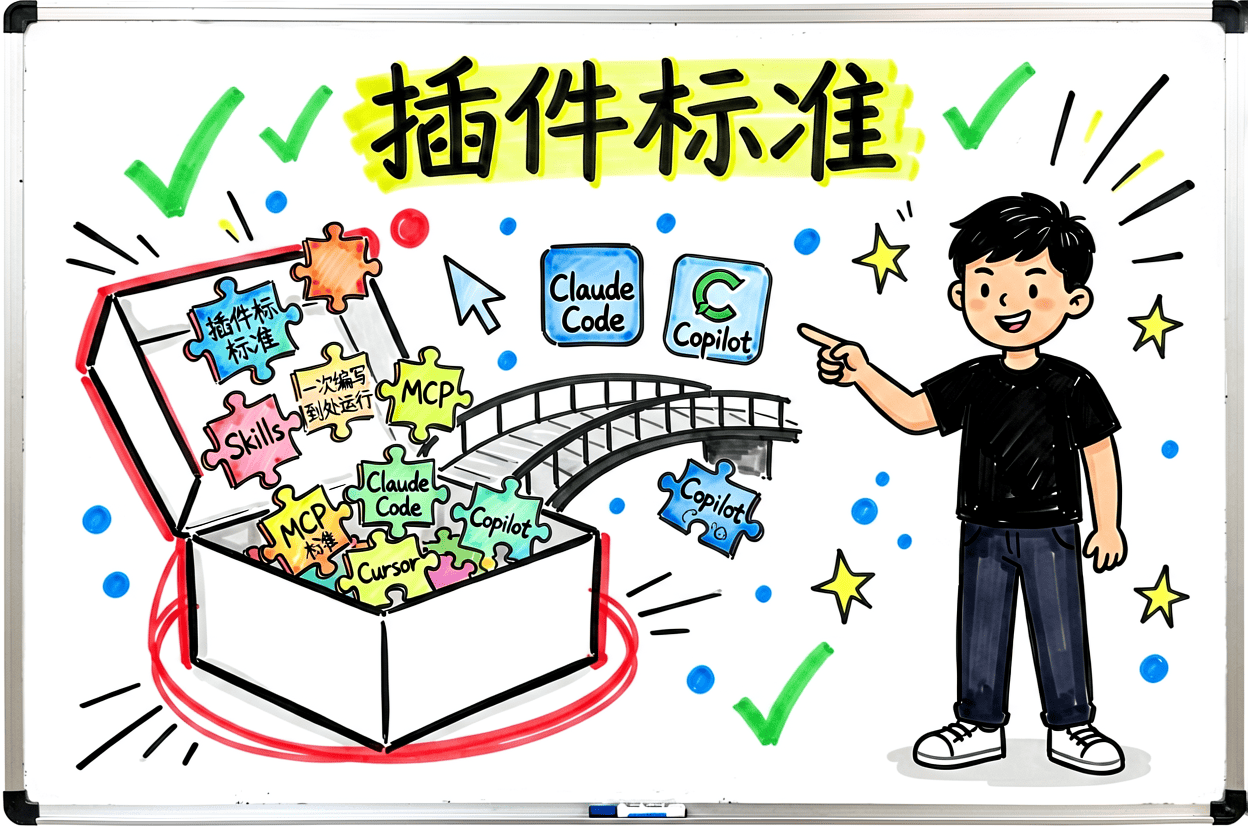
One plugin standard, shared across seven tools.

Fig: Open Plugins — install once, works across seven tools
AI coding tools are multiplying: Cursor, Claude Code, Codex, Grok Build — each with its own plugin format. Then came Open Plugins.

It's an open standard maintained by Vercel Labs. Install one plugin, it runs across seven tools.

Building a mini program with AI: from registration to submission, every step I actually walked through

· 8 min read
Booker Zhao
AI Full-Stack Engineer / CloudBase AI ToolKit Author

To be honest, I rarely think a "perk" is worth a dedicated post. This one is different.

In July 2026, three things lined up:

  • WeChat DevTools opened up AI agent Skills, so the Cursor / Claude Code you use can directly read DevTools console logs, look at simulator screenshots, auto-deploy cloud functions.
  • The mini program growth plan's second phase bumped Token from 100M to 1B, image generation from 10K to 100K, and upgraded the model to Hunyuan Hy3.
  • CloudBase flattened the backend — AI tools connect directly to its models, Token comes out of your plan, and you can deploy right after writing.

Put together, the hardest hurdles to "one person building a complete mini program alone" were all cleared. Below is my hands-on note. I walked every step, and I'll tell you what's good and what's not.

Hands-free coding: the logic behind Claude Code's five 'let-go' mechanisms

· 12 min read
Booker Zhao
AI Full-Stack Engineer / CloudBase AI ToolKit Author

If you've used Claude Code for complex tasks, you've probably experienced this:

You ask it to replace all fetch calls with axios, grab a coffee, come back — and it's done three files and stopped waiting for approval. Repeat seven or eight times, and your coffee is cold.

Or you ran /loop overnight to watch a PR, wake up to find it got stuck on a git merge conflict at 2 AM. The window has been open all night.

Or you launched three sub-agents to research independently — and ended up with three contradictory conclusions because none of them saw what the others were doing.

The root cause isn't that AI isn't smart enough. Claude Code is turn-based — each turn does one thing, then waits for you to decide the next step. To make it run continuously, decide autonomously, and work in parallel, you need orchestration mechanisms to bridge the gap.

Claude Code gives you five: /goal, /loop, sub-agent, Agent Teams, and Workflows.

Pick wrong, and you're not just wasting tokens — you're making things more complicated.

Codex grew 7x in 6 months and non-programmers are using it — here's how to go from zero to deployed multiplayer game

· 6 min read
Booker Zhao
AI Full-Stack Engineer / CloudBase AI ToolKit Author

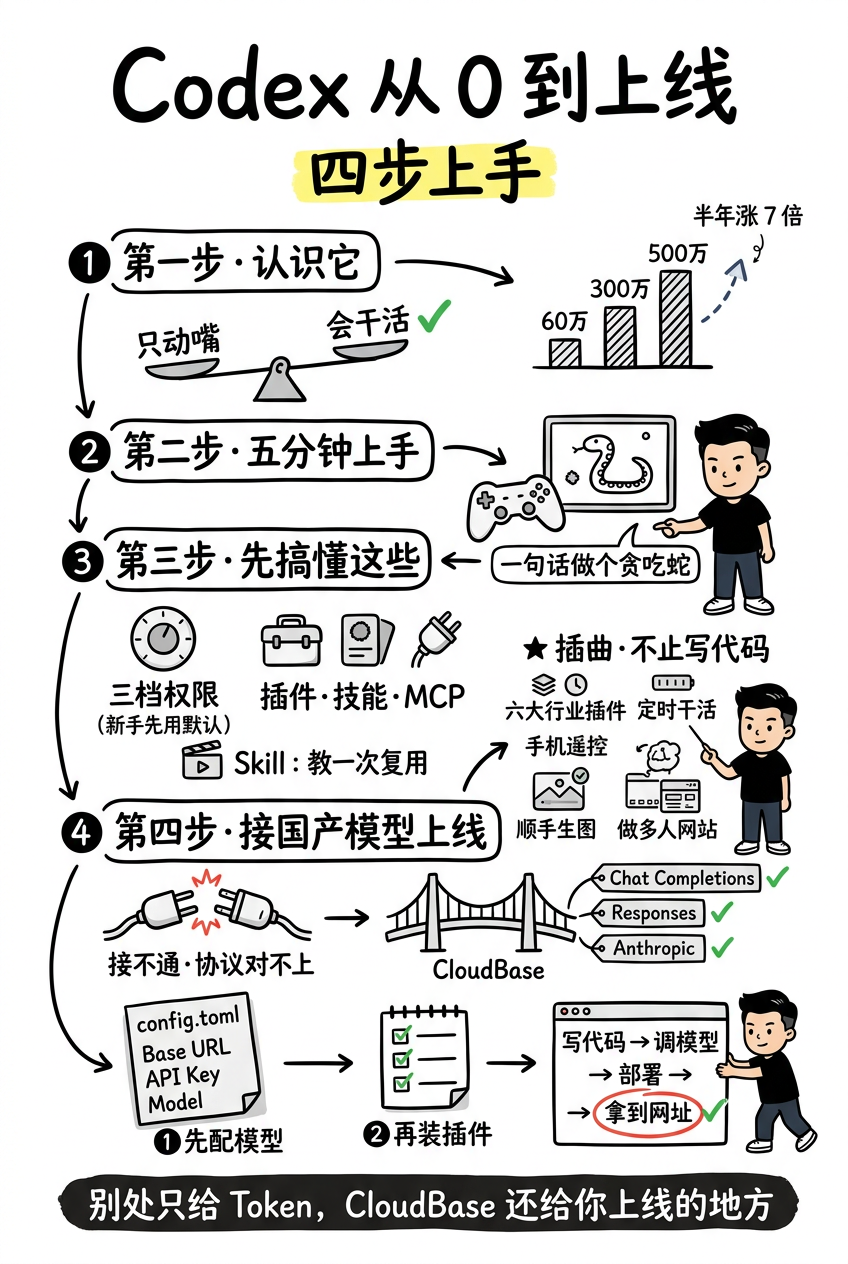
This article covers four things: ① What Codex is and what it can do → ② Five-minute hands-on: build a playable game → ③ Core usage and features → ④ Connect low-cost Chinese open-source models and deploy your app so others can access it.

Short on time? Codex now supports DeepSeek, GLM, and other affordable models. Want to save money + one-click deploy? Jump to Step 4 and copy one config. Want the full picture? Read on.

Codex at a glance: from what it is, to configuring models, installing plugins, and deploying

Adding AI to a mini program: how to keep API keys safe and switch models

· 5 min read
Booker Zhao
AI Full-Stack Engineer / CloudBase AI ToolKit Author

A question I get a lot: how do you add AI to a mini program?

Most people asking aren't stuck on the coding. They're stuck on the concrete parts: where to put the API key safely, why the mini program can't call the model API directly, how streaming replies work, whether switching models is a hassle.

This post covers the pitfalls I hit and the standard way I do it now. The core idea is one sentence: let the cloud platform be the middleman — the frontend never touches a secret key.

Your remote AI agent needs auth? A Device Flow protocol deep-dive

· 10 min read
Booker Zhao
AI Full-Stack Engineer / CloudBase AI ToolKit Author

I was setting up GitHub CLI on a TencentOS server recently — an AI agent was running on it, and I needed to talk to it via phone IM. Classic authentication puzzle:

  • No browser (remote server, no GUI)
  • No sudo (can only install to my ~/bin)
  • Needed gh to authenticate and create PRs
  • Critical: couldn't send a Token through the IM chat (IM servers, chat history, agent context — every layer sees it)

Traditional OAuth requires browser redirects. Not an option here.

First instinct: generate a Personal Access Token manually, pipe it in with gh auth login --with-token. It works, but it's painful — open GitHub settings, find the token page, select permissions, copy, paste in terminal. Months later when the token expires, repeat everything.

I dug through GitHub CLI's docs and found it uses a different path by default: Device Flow (device authorization grant). Running gh auth login --web prints a verification code. You open github.com/login/device on another device, enter the code, and the terminal auto-completes auth.

The whole process takes under two minutes. I thought — this is clever. Worth taking apart to see how it works under the hood.

AI Programming's Second Half: Don't Let AI Code Live Only on Localhost

· 5 min read
Booker Zhao
AI Full-Stack Engineer / CloudBase AI ToolKit Author

I've been working with Agent Skills for a while now. The most frustrating discovery: it's not that AI can't write code. It's that the code it writes only works on localhost, and it keeps ignoring the rules you set.

This article covers two things:

  1. Making AI-generated code actually deployable — AI writes demo-quality code, full of security holes. The root cause: AI doesn't understand production environments.
  2. Fixing "AI has Skills but won't use them" — activation rates can be as low as 20%. Here's how we pushed that to 84%.

How to Generate "Non-Oily" AI Images: 3 Anti-AI Style Guides

· 4 min read
Booker Zhao
AI Full-Stack Engineer / CloudBase AI ToolKit Author

When I first started using AI image generation, I didn't pay much attention to style. Whatever Midjourney defaulted to, I used: rich lighting, flawless detail, vibrant colors. The result? Images that looked technically impressive but felt... wrong. They screamed "made by AI."

I spent months experimenting with prompts, stripping back parameters, testing different style combinations. After a lot of trial and error, I found the core principle: less is more, add texture, flatten, desaturate.

These three style recipes are the ones that worked best in practice. Just append the prompt suffix to your base prompt and you're good to go.

Vibe Coding isn't a myth: non-developers can build real apps with AI too

· 6 min read
Booker Zhao
AI Full-Stack Engineer / CloudBase AI ToolKit Author

Ever run into this: AI generates your app, then it breaks and you don't even know what question to ask? AI gives you N solutions but you have no idea which one is right?

This is the pain point for many non-technical people using AI to code:

  • Debug hell: page shows something wrong, but no idea which layer is the issue (frontend? backend? deployment?)
  • Can't ask the right question: don't know how to describe the problem so AI understands and gives accurate answers
  • Unclear learning path: know you need some basics, but don't know where to start or what's enough

Today I'll share a systematic approach — from foundational concepts to debugging techniques to backend solutions — to take you from "able to generate apps" to "able to build real, usable apps."