Codex grew 7x in 6 months and non-programmers are using it — here's how to go from zero to deployed multiplayer game

This article covers four things: ① What Codex is and what it can do → ② Five-minute hands-on: build a playable game → ③ Core usage and features → ④ Connect low-cost Chinese open-source models and deploy your app so others can access it.
Short on time? Codex now supports DeepSeek, GLM, and other affordable models. Want to save money + one-click deploy? Jump to Step 4 and copy one config. Want the full picture? Read on.
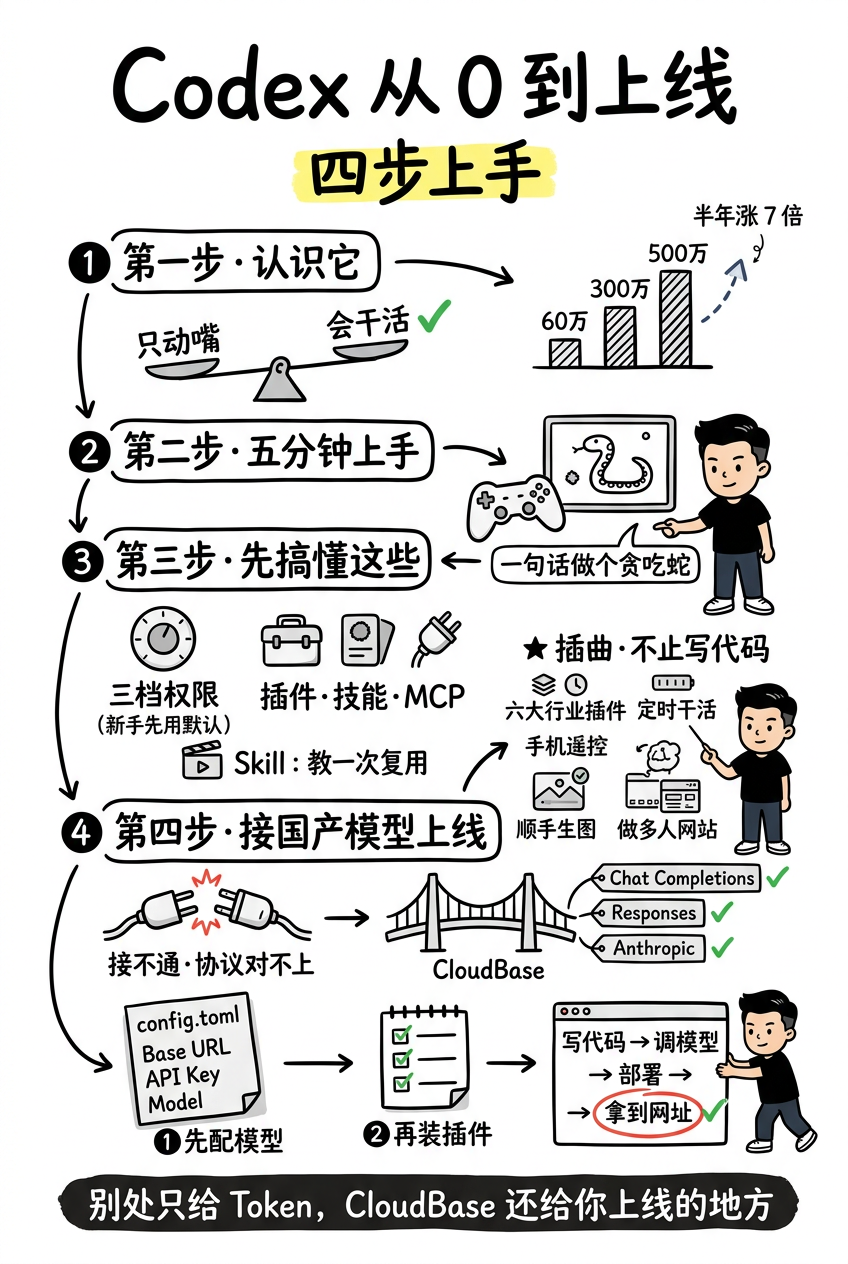
Step 1 · Meet Codex
Codex is OpenAI's AI coding desktop tool. In the first half of 2026, its weekly active users grew from 600K to 5 million. The growth was so notable that in April, Sam Altman posted on X: "Resetting all user limits — I'll reset again for every million more." Most interesting stat: about 20% of users don't write code at all — they're product managers, operators, investors.
What matters to you: on June 18, OpenAI opened up third-party models. DeepSeek, GLM, Kimi — all pluggable now. Run cheap Chinese models and dramatically cut your costs.
How is it different from ChatGPT?
Most people's first reaction: "Isn't this just ChatGPT that can write code?" Not even close.
ChatGPT is conversational — you ask, it answers, it gives advice, but you still have to do the work yourself. Codex works directly on your file system. You tell it "write a Snake game" — it creates files, installs dependencies, runs and debugs.
Example: ask ChatGPT to write Snake, it gives you code. You have to create the file, paste it, install libraries, run it, debug it. Ask Codex to write Snake — it creates a project folder, generates code, installs dependencies, runs the game. If it errors, it reads the error, fixes the code, and retries until it works.
ChatGPT is an advisor. Codex is the one who gets things done.
Step 2 · Five minutes to a playable game
Install it: Download · Login · Meet the UI
Go to codex.com, download the desktop app, log in with your OpenAI account.
The interface is simple — three parts:
- Left: project file list
- Center: conversation window + code editor
- Bottom right: terminal (see what it's doing)
First task: one sentence, build Snake
Open Codex, type in the chat:
Write a Snake game in Python using pygame, make it runnable
It starts working immediately. Watch the center panel — it creates files, writes code, then auto-runs.
It might error on the first try (e.g., pygame not installed). It detects the problem, installs the dependency, and retries. Eventually a window pops up and Snake is running.
From opening Codex to playing the game — five minutes if you're quick.
Step 3 · Before you dive in, understand these
① Three permission levels: what Codex can touch
Codex has three permission levels:
- Clipboard Only: read-only clipboard access. Safe but useless.
- Read & Write Files: can read and write files. The sweet spot for daily work.
- Admin: can install software, change system settings.
Default is Read & Write — good enough for building games, writing code, and deploying.
② Plugin · Skill · MCP: three easily confused terms
They're not the same thing:
- Plugin: external APIs Codex can call — like connecting a database, sending messages, checking weather. Codex ships with dozens built in.
- Skill: a set of instructions that teach Codex how to do something. Write a Skill once, and next time just say the word.
- MCP Server: a universal interface that lets Codex talk to external tools.
③ The killer feature: Skills — teach it once, reuse with one sentence
Example: you want Codex to always run tests, check types, and format code after writing. Write a Skill:
## Code Quality Rules

After completing any code changes:
1. Run `npm test` to ensure all tests pass
2. Run `npx tsc --noEmit` to ensure no type errors
3. Run `npx prettier --write .` to format code
Save it as a Skill. Next time say "run my quality rules" — it follows the full process.
Interlude · It's way more than just writing code
⏰ Scheduled automation
Codex supports scheduled tasks: run tests every morning at 9 AM, update dependencies every Monday. It does the grunt work while you sleep.
🚀 One-click website deployment
Finished a web page? Tell Codex and it deploys. With MCP plugins, it can connect directly to cloud services.
📱 Remote control from your phone
Codex has a mobile app — check task progress and send new commands on the go. See a bug during your commute? Tell it to fix it from your phone.
📄 Generate docs and images too
Architecture diagrams, changelogs, illustrations — it can do all of those.
Step 4 · Use cheap Chinese models and deploy your game
First, the problem: saving money with Chinese models hits a wall
Codex defaults to OpenAI's own models — fine for daily development. But if you're running lots of automated tasks or team collaboration, token consumption adds up fast.
On June 18, Codex opened up third-party model support. But there's a catch: you need to handle API keys, model configuration, and deployment environment yourself.
The solution: CloudBase (configure models + install plugins)
CloudBase is Tencent Cloud's Serverless platform, and its AI Toolkit solves this exact problem.
Configure models (5 minutes)
CloudBase supports both OpenAI and Anthropic protocols. DeepSeek, GLM, Kimi — all accessible with one API key. Once configured, select Chinese models directly in Codex. Token costs drop to a fraction of the original.
Install plugins (one-click deployment)
With the CloudBase AI Toolkit plugin installed, Codex can deploy apps directly from the conversation. No need to manually log into a cloud console, configure domains, or upload files. Just say "deploy it" and it handles everything.
Final thoughts
What Codex has proven in the last six months: AI tools are no longer about "can they answer questions" — it's about "can they finish the job and deliver the goods."
For someone like me, the real barrier isn't "are there cheap models" — it's the hassle of integration and having nowhere to deploy. The protocols need to match, and you need a place to land what you built. After going through the whole cycle, my answer is CloudBase: all three protocols compatible, Chinese models accessible with one key, and one-click deploy from the same window.
Other token plans just give you tokens. CloudBase gives you a place to ship.
Have you used Codex? For coding or something else? Drop a comment — I read them all.